Saturday, 11 June 2016

BASICS OF C++ PROGRAMMING

ABOUT C++ 

○ C++ is a programming language
○ C++ is a middle-level programming language
○ Developed by Bjarne Stroustrup starting in 1979 at Bell Labs
○ C and C++  become a widely used programming language
○ C++ fully supports object-oriented programming (OOP's).
OOP's is a model of programming language. or It is a Concept.


FEATURE OF C++

○ C++ is Easy to learn and Understand.
○ C++ is usually considered a "multi-paradigm" language.
○ It produces more efficient programs.
○ It can also handle low-level activities as well as high level activities
○ It can be compiled on a variety of computer platforms.
○ C++ is an object oriented programming language therefore it supports
        1. Polymorphism (one name and many forms)
        2. Encapsulation (wrapping of a data & function in single unit)
        3. Data Abstraction ( hiding of data and showing important features)
        4. Inheritance (deriving data from one class to another)
        5. Data Banding (communication between objects)
○ C++ is not portable. (means source code is runs anywhere but exe file does not run )   


USES OF C++


○ C++ is used by thousands of programmers to develop an application .
○ C++ is used to write device drivers and other software's
○ C++ is widely used for research
○ The primary user interfaces of systems are written in C++ (specially for windows and mac).


REQUIREMENTS  (ENVIRONMENT SET UP)


○Actual C++ compiler, which will be used to compile your source code to executable program.
○Most C++ program extension is name.cpp
○Most used and free available compiler  are listed below ...click for download 


EXAMPLE OF A C PROGRAM 


#include<iostream.h>      //header file

int main()

{

cout<<"Hackers Rocks";  // used to display
return 0;   // function to returning something.
}


Explanation:-

1- Comment:
◘ It is the statement in the programs which compiler ignores.
◘ It increases readability of the program.
◘ Comments are of two type, single line and multi-line comment.

2- Header File:
◘ iostream is a header file.
◘ iostream stands for "Standard input output".
◘ It contains definition of input/output facilities in C programming.

3- Main():
◘ whenever parenthesis " () " are used. It is called function in C programming.
◘ main() function is like the entry point in the program.

4-cout:
◘ cout is also a function.
◘  " << " is called excertion operator.
◘ the definition (work ) of cout is, to display whatever is written after the  << and ;(semicolon) .
◘ the definition of cout is given by iostream.h file.


After Compilation  

When ever you compile your source code ... then the compiler generate 4 types of files 
○ name.cpp (source code file)
○ name.bak  (back up file)
○ name.txt  (normal text file)
○ name.exe (executable file)
 all four types of file ...you can find in C Drive --> Program Files-->turbo c++ -->bin --> all files present here....after successful compilation.


BOOKS 

○ Object Oriented Programming with C++      - E Balaguruswamy
○ Let Us C++      - Yashwant Kanetkar
○ C++: The Complete Reference     - Herbert Schildt


Friday, 10 June 2016

BASICS OF C PROGRAMMING


ABOUT C 


○ C is a programming language.
○ It is a low-level programming language.
○ That was developed by Dennis M. Ritchie at Bell Labs.
○ And firstly implemented  in 1972.
○ C is very helpful to Develop UNIX operating system.
○ The C compiler, and essentially all UNIX application programs have been written in C.
○ C become a widely used professional language.


FEATURE OF C


○ C is Easy to learn.
○ C is a Structured language.
○ It produces more efficient programs.
○ It can handle low-level activities.
○ It can be compiled on a variety of computer platforms.


FACTS ABOUT C PROGRAMMING


○ C was invented to write an operating system called UNIX.
○ C is a successor of B language which was introduced around the early 1970's.
○ The language was formalized in 1988 by the American National Standard Institute (ANSI).
○ The UNIX OS was totally written in C.
○ Today C is the most widely used and popular System Programming Language.
○ Most of the state-of-the-art software have been implemented using C.
○ Today's most popular Linux OS and RDBMS MySQL have been written in C.


USES OF C


○ Operating Systems (FOR UNIX KERNAL).
○ Language Compilers.
○ Assemblers.
○ Text Editors (LIKE VIM TEXT EDITOR).
○ Network Drivers.
○ Modern Programs.
○ Databases.
○ Utilities.


REQUIREMENTS  (ENVIRONMENT SET UP)

•For setting up the environment for C programming language, it is
  is done by two ways:
(a) Text Editor and
(b) The C Compiler

I prefer to use C compiler, for download use below links to download compiler ....

1-TURBO C COMPILER
2-CODE BLOCKER COMPILER
3-MinGW COMPILER

Note-Download the compiler according to your machine configuration like 32 bit or 64 bit and according to your operating system.


BEST BOOKS

  • The C Programming Language is written by Brian W. Kernighan and Dennis M. Ritchie.
  • C: The Complete Reference is written by Herbert Schildt.
  • Programming in ANSI C is written by E Balagurusamy.
  • Let Us C is written by Yashavant Kanetkar.
  • Head First C is written by David Griffiths.

EXAMPLE OF A C PROGRAM 

// this is single line comment

/* this is a multiline comment* /

//program to displays the name of "Hackers Rocks"


#include<stdio.h>                  // header file
void main()                             //main function

{

printf("Hackers Rocks");      //show on screen

}


Explanation:-

1- Comment:
 ◘ It is the statement in the programs which compiler ignores.
 ◘ It increases readability of the program.
 ◘ Comments are of two type , single line and multi-line comment.

2- Header File:
 ◘ stdio is a header file.
 ◘ stdio stands for "Standard input output".
 ◘ It contains definition of input/output facilities in C programming.

3- Main():
 ◘ whenever parenthesis " () " are used. It is called function in C programming.
 ◘ main() function is like the entry point in the program.

4-printf: 
 ◘ printf() is also a function.
 ◘ the definition (work ) of printf is to display whatever is written inside the parenthesis ( ).
 ◘ the definition of printf is given by stdio.h file.


Also READ THIS:-

Hacking For Newbies...


All of you have been thinking that where you should start to learn ETHICAL HACKING.
I am here to suggest you How to Start learning and what topics should be covered during staring phase.
I am creating notes for you with parts, now you can easily learn.
I have created a series of ten chapters in which i have started from beginning and touched an upper level by grasping all little techniques and explained thoroughly with environment setup and their links in which they have been described more fluently which is mostly basics without which you cannot proceed further.


CHAPTER 1 

INTRODUCTION

Firstly we have to know that what is hacking,why we need it and some of its legalities. As well as scopes of ethical hacking.

  • What is Hacking?
  • Who is Hacker?        
  • Career in Hacking?
CLICK HERE to find out answers of these questions 


CHAPTER 2 

SOME BASIC TERMS (Theoretical)

Now you have to knows some of basic terms which you need to know...these terms are always used in life time of your hacking carrier, these terms are based on the concepts of NETWORKING and some HACKING TERMINOLOGIES 

  • I,P Address
  • Firewall
  • Vulnerability etc
CLICK HERE to go and learn


CHAPTER 3 

SWITCH TO LINUX 

This is the most critical time for you, now you have to switch from your operating system to linux operating systems. There are many advantages of linux over microsoft windows.
and the linux help you to enhance your hacking speed..i suggest you to use kali linux or backtrack.
because these distribution(versions) of linux is famous among the hackers or pen-testers . In these o/s there are many pre-loaded tools which you need during the learning or hacking process.

The Kali Linux and Backtrack is used for vulnerability or hacking. TO know more
CLICK HERE for LINUX INTRODUCTION
CLICK HERE for KALI INTRODUCTION
You can also refer to a video of a site GURE99


CHAPTER 4 

COMMANDS OF LINUX

Now, you have to learn commands in linux because in CLI(command line interface) or in terminals mode ... you have more options that is not available in GUI(graphical user interface) mode and it will save your time and work as well as enhance your hacking speed.
To know Basic Commands CLICK HERE 
To know About File System of Linux CLICK HERE


CHAPTER 5 

TOOLS IN  KALI-LINUX

These tools are very helpful for you..now you have to knows some of the tools name and what it does for you...and how to use that tools.
There are approx 600+ hacking tools which are pre-installed in Kali Linux or Backtrack.
Go to the Kali Linux official Website and see the numerous of tools. (CLICK HERE).

Don't worry you don't need to know about all the kali tools , there are some most important tools which you have to know and to use it

Commonly USED TOOLS... CLICK HERE
To Hack LIVE WEB SITES... CLICK HERE
BURP-SUITE... CLICK HERE
METASPLOIT... CLICK HERE


CHAPTER 6

HIDE YOUR SELF

It is very necessary to hide yourself in internet or we can say the world of WWW.
There are many ways to hide yourself .... With the help of software or application and by using proxies.

From P.C or LAPTOP... CLICK HERE
From Smart Phones... CLICK HERE   
By Using PROXIES... CLICK HERE


CHAPTER 7

ACTIVITY TIME 

First of all , I like to congratulate to all of you that you can learn more then 60% of the basics which you need life time for your bright carrier. 
Now we will do some activity to make this tutorial interesting.

1-For learning WI-FI HACKING

2-For Learning FACEBOOK HACKING.... CLICK HERE 


CHAPTER 8 

INFORMATION GATHERING

This is the most critical part in the hackers life because all the activities like selecting tools is all depended on what information you will get about the user. Therefore information gathering is very important -Information Gathering Tools In Kali-Linux

NOTE- This is illegal, so please setup your HACKING LAB

  1. for LINUX USERS
  2. for WINDOWS USERS 


CHAPTER 9 

WAYS TO CRACK PASSWORD

This is also an important part , now you have the information about the victim(target user) now you have to know which tool should be used to crack this challenge. 
CLICK HERE to know more...

NOTE- PLEASE STICK TO THE LAB


CHAPTER 10

INTERESTING ACTIVITIES 

Some more activities that you love to do...


1-RECIPE OF BOMB... CLICK HERE
2-HIDE DATA BEHIND IMAGE... CLICK HERE
3-ACCESS OTHER COMPUTER... CLICK HERE


ENJOY LEARNING !!!


Congratulation !!! YOU have successfully completed all  the chapters of your new life...
Now you can feel some power...use this for your knowledge and not for some illegal activities. 


Thursday, 9 June 2016

SET-UP your own Lab for HACKING (for Linux)


Hello Friendz,
Today i am going to show "How to set up your own lab for hacking". It is very necessary to set up our own lab because in India hacking is not legal...as well " Practice makes a man perfect " so it is very necessary to practice and apply those concepts that you have learned.
so let's start to


Requirements for windows


1- Xampp (click here to download)
    or you can also download
    Wamp (click here to download)

2- Page setups
or
multilldea (click here to download)

( download any one ... either multilldea or dvwa)


Setup (steep wise)


1- Download Xampp or wamp for linux
2- start terminal [ cntl + atl +t ]
3- type " chmod +x xampp-linux*.run " 
4- type " ./xampp-linux*.run "
5- that's all
6- now, for start type " /opt/lampp/lampp start  "
7- for stop type "  /opt/lampp/lampp stop  "
8- for restart type " /opt/lampp/lampp restart  " 


FOR MORE INFORMATION PLEASE WATCH THIS YOU TUBE VIDEO (FOR Xampp)


How to install wap-pages in Xampp or wamp to hack


.
1- Now, download multillidae or dvwa (any one)
2- unzip dvwa using terminal .... type "  unzip DVWA*.zip "
3- Now place the unzipped files in your public html folder... type " mv dvwa /opt/lampp/htdocs "
4- Now start xampp ... for that type  "  /opt/lampp/lampp start  "
5-Now browse ... type "  http://127.0.0.1/dvwa/index.php "


FOR MORE INFORMATION PLEASE WATCH THIS YOU TUBE VIDEO (FOR install dvwa in xampp)


" ENJOY HACKING !!!! "


Also READ THIS:-


Wednesday, 8 June 2016

HACK WIFI USING FERN WIFI CRACKER TOOL (Step-Wise)


Fern Wi-Fi Cracker is able to crack or hack WEP, WPA, and WPA2 secured wireless networks.
Fern Wi-Fi Cracker is a tool in Kali Linux , it basically helps to crack WiFi passwords with GUI (Graphical User Interface) mode. It is very simple to use… Fern also provides some extra functionality for hijacking sessions and locating a computers Geo Location via its Mac address, and a lot.


Requirements


1- kali linux o/s (click here to download)

or

bootable pendrive with kali linux ( click here to know more)


2- word list

The Pirate Bay Download Link

ISO Hunt Download Link

Torrent Hound Download Link

(click here to download)


Features

Fern Wifi Cracker supports-

1. WEP Cracking
2. WPA/WPA2 Cracking
3. Automatic saving of key in database on successful crack
4. Automatic Access Point Attack System
5. Session Hijacking (Passive and Ethernet Modes)
6. Access Point MAC Address Geo Location Tracking
7. Bruteforce Attacks (HTTP,HTTPS,TELNET,FTP)


way to FERN -WIFI- Cracker (Step-Wise)


1- Go to Application (on the top left Conner in kali linux)
2- Go to Kali-Linux
3- Go to Wireless Attacks
4- Go to 802.11 Wireless Tools
5- Go to Fern-Wifi-Cracker double click on it and here we go...
6- now a beautiful window opens


7- now go to step1 (in above picture) where you have to select interface " wlan0" or "wlan1"
8- go to step 2(in above picture) where you have to start wifi
9- go to step 3 or 4 (in above picture) according to your need....if you want to hack WEP wifi password go to step 3 and if you want to hack WPA wifi password then go to step 4.
10- now a new window open


select the wifi...hack

11- then go to browse and upload (give the link of wordlist)
12- then click attack start (on the top right side of wifi list )
13- here you GOOOO....and the password is saved in "key data base" [step 5(in first pic) ]


Enjoy Hacking


Note- It takes time according to the length of wordlist so i suggest you...after start attacks go to the bed and take a nap and when you wake up ...you will be able to see the magic.

-if the password is not present in the wordlist then this tool is unable to crack the wifi password in that case download other wordlist.

-this is only for educational purpose so please don't do anything illegal.


ALSO READ -

SET-UP your own Lab for HACKING (for WINDOWS)


Basic Commands for Linux


Wednesday, 1 June 2016

SET-UP your own Lab for HACKING (for WINDOWS)


Hello Friendz,
Today i am going to show "How to set up your own lab for hacking". It is very necessary to set up our own lab because in India hacking is not legal...as well " Practice makes a man perfect " so it is very necessary to practice and apply those concepts that you have learned.
so let's start to


Requirements for windows


1- Xampp  (click here to download)

2- Page setups

           ( download any one ... either multilldea or dvwa)


Setup (steep wise)

  1. download Xampp
  2. install xampp form its installer.
  3. download multillidae or dvwa (any one)
  4. now unzip multillidae or dvwa
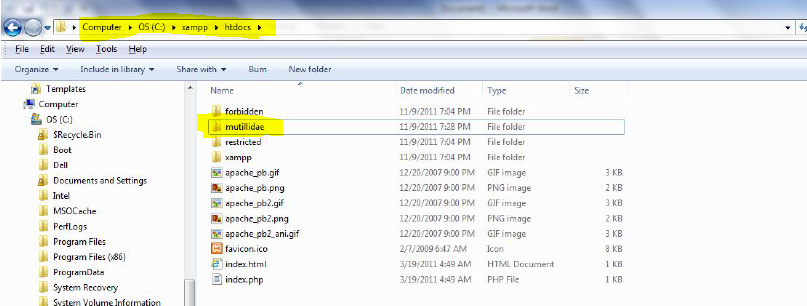
  5. now go to my computer or this pc 
  6. and search for the xampp folder
  7. after that go to htdocs
  8. and paste  multillidae or dvwa in the " htdocs " folder
  9. afterwords go to xampp control pannel
  10. and start " apache " and " mysql "
  11. now go to web browser and type in url bar
  12. localhost/mutillidae or localhost/dvwa  


Screen shots

After installation of xampp this control panel will appear...now you have to start Apache and mySql 

after that copy and paste  multillidae or dvwa in the htdocs folder


now go to browser in enter url 
localhost/mutillidae or localhost/dvwa 
you can also type 
127.0.0.1/mutillidae or 127.0.0.1/dvwa


ALSO READ FOR LINUX SET-UP...

SET-UP your own Lab for HACKING (for Linux)


 "   ENJOY HACKING !!!!  "


Also READ THIS:-


Tuesday, 31 May 2016

Basic Commands for Linux


Hello Friends,
Today i am going to tell you some basic commands of linux which you in TERMINAL to speed up your works...
This are the BASIC COMMANDS FOR BEGINNERS ONLY...


File Operations


pwd                          Print Working Directory(Name of current directory)
cd                             Changing The Working Directory (like windows)
cp                             used Copy Files Or Directory
rm                            Remove Files And Directory (delete)
ls                              List Of Directory
mkdir                       Make Directory (make new folder)
cat                            Concatenate Files And Print On Standard Output(terminal)
mv                            Move Files
chmod                     Change Files Permissions


Know Your System

uname                         Print System Information
who                            Show Who Is Logged On
cal                              Displays Calculator
date                            Print System Date And Time
df                               Report File System Disk Space Usage
du                               Estimate File Space Usage
ps                               Displays Information Of Current Active Processes
kill                             Allows To Kills Process (use to end process )
clear                           Clear The Terminal Screen
cat                              to Display
meminfo                    Display Memory Information


Compression

tar                            Store and Extract Files From An Archive File
gzip                         Compress Or Decompress Named Files


Network

ifconfig                      To Config Network Interface
ping                           Check Other System are reachable from The Host System
wget                           Download Files From Network
ssh                             Remote Login Program
scp                             Secure copy (remote file copy program)
ftp                              Download/Upload Files From/To Remote System
last                             Displays List Of Last Logged In User
telnet                         Used To Communicate With Another Host Using the Telnet Protocol


Searching Files

find                          Search For Files In A Directory Hierarchy
locate                       Find Files By Name


Other Commands

join                            lines of two files on a common field
fold                           wrap each input line to fit in specified width (used in formatting)
date                           print or set the system date and time
vim                           a programmers text editor


ALSO READ THIS:-


WINDOWS SUBSYSTEM FOR LINUX

Microsoft partnered with Canonical (creator of Ubuntu) to bring Linux environment experience in Windows 10. Through Windows Subsystem F...